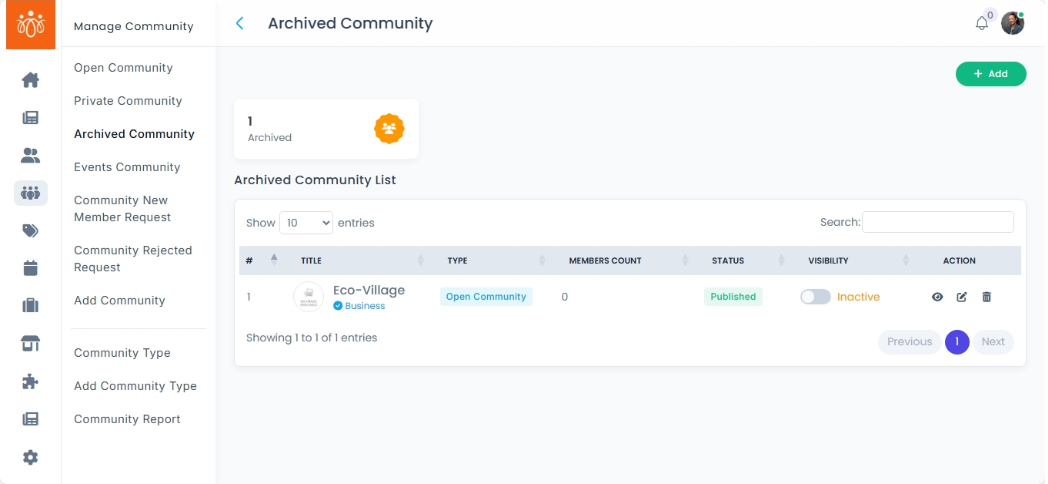
Managing Archived Communities
Navigation Path:
Community → Archived Community
Overview:
The Archived Community section contains all communities that have been deactivated or archived by administrators. This feature allows for efficient management of inactive groups, offering options to either restore or permanently delete archived communities based on organizational needs.
When to Use:
-
You want to review communities that are no longer actively in use.
-
You need to restore a previously archived community to active status.
-
You wish to permanently delete communities that are no longer needed to free up system resources.
Steps to Manage Archived Communities:
-
Access Archived Communities
Navigate to Archived Community under the Community menu to see a list of all deactivated or archived groups. -
Review Archived Community Details
Select any archived community to view its details before deciding on next actions. -
Restore an Archived Community
Choose the Restore option to reactivate the community and make it accessible again to users. -
Permanently Delete an Archived Community
Choose the Delete option to remove the community permanently from the platform.
Note: This action is irreversible.
Best Practices:
-
Periodically review archived communities to determine if any should be restored.
-
Permanently delete communities only after careful consideration to avoid data loss.
-
Maintain clear records of archived groups for audit and compliance purposes.
Tip:
Use archived communities as a historical record and resource for understanding past group activities and engagements within your platform.