Managing the Add Community Form
Navigation Path:
Community → Add Community Form
Overview:
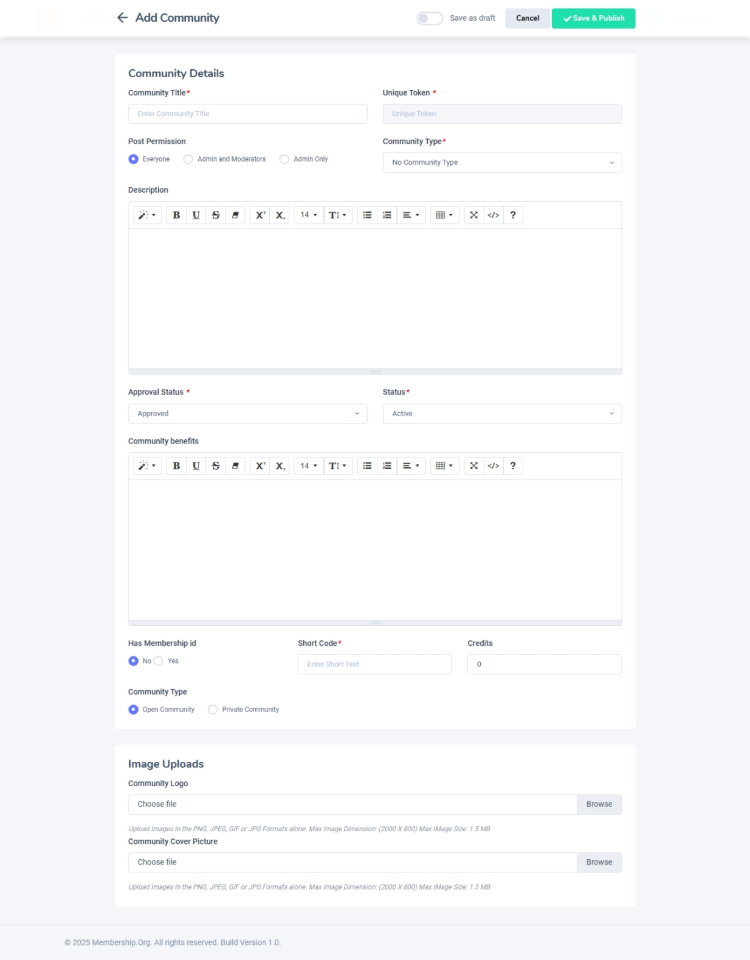
The Add Community Form allows administrators to create new communities on the platform. By providing relevant details such as the community’s title, description, cover image, type, and assigning moderators, admins ensure every new group is set up efficiently and ready for engagement.
When to Use:
-
You want to launch a new interest group, discussion forum, or event-based community.
-
You’re organizing a private group for a specific team, project, or campaign.
-
You need to set up public or open-access spaces to foster company-wide interaction.
Steps to Add a New Community:
-
Access the Add Community Form
Navigate to the Add Community Form from the Community menu to begin the process. -
Fill in the Community Details
-
Title: Enter a descriptive and easily identifiable name for your community.
-
Description: Provide a brief summary outlining the purpose or theme of the community.
-
Cover Image: Upload an image that visually represents the community’s focus or topic.
-
Community Type: Select whether the community will be Open (visible to all users) or Private (invite-only or restricted access).
-
Assign Moderators: Choose one or more moderators responsible for managing posts, discussions, and member activity within the community.
-
-
Save and Publish
Once all required fields are completed, click Save & Publish.
A confirmation message will indicate your new community is live and accessible based on its designated visibility settings.
Best Practices:
-
Choose a clear and engaging title that accurately reflects the community’s purpose.
-
Write concise descriptions to help users quickly understand the group’s objectives.
-
Select a cover image that is professional, inviting, and relevant.
-
Assign active and responsible moderators to ensure consistent community management.
Tip:
Periodically review your communities after creation to ensure continuous engagement, update descriptions, and refresh moderator assignments as needed.