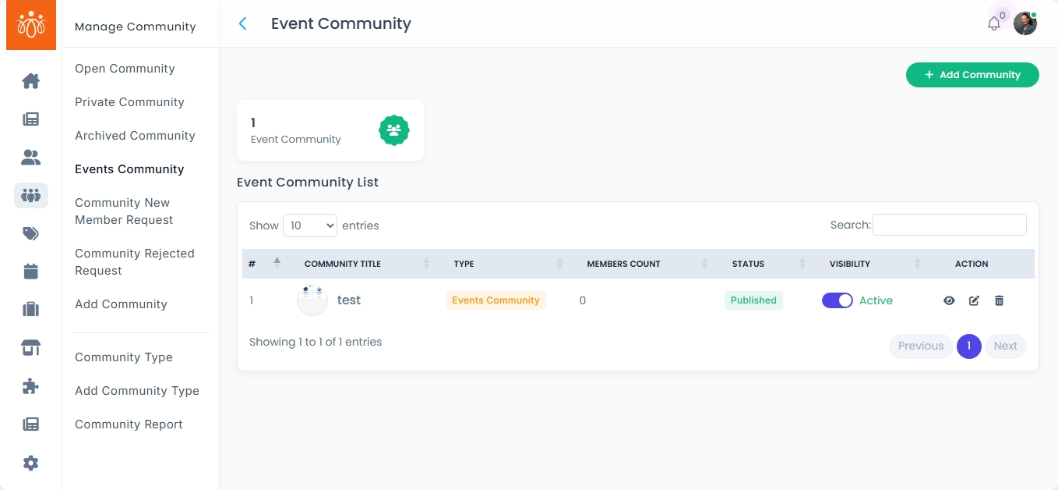
Managing Events Communities
Navigation Path:
Community → Events Community
Overview:
The Events Community section is dedicated to communities created specifically for events or programs. This feature allows administrators to monitor event-related engagement, manage event community details, and maintain the relevance of active event groups.
When to Use:
-
You want to view and track participation in event-specific communities.
-
You need to update or edit details related to an event community.
-
You want to archive past or inactive event communities to keep the platform organized.
Steps to Manage Events Communities:
-
Access Events Communities
Navigate to Events Community under the Community menu.
You will see a list of all communities created for events or programs. -
View Participation
Select a specific Events Community to view member participation, including active members, posts, or other engagement metrics. -
Edit Community Details
To update event information or settings, click Edit.
Modify the relevant details such as event name, description, dates, or other parameters.
Save your changes to update the community. -
Archive an Events Community
When an event community is no longer active or relevant, select the community and choose the Archive option.
Archiving removes the community from active lists but retains records for reference or compliance.
Best Practices:
-
Regularly monitor participation to assess event engagement levels.
-
Keep event community details accurate and up-to-date to ensure clear communication with participants.
-
Archive old event communities promptly to avoid clutter and confusion for users.
Tip:
Use the Events Community feature to foster focused discussions and collaboration around programs, enhancing participant experience and event success.