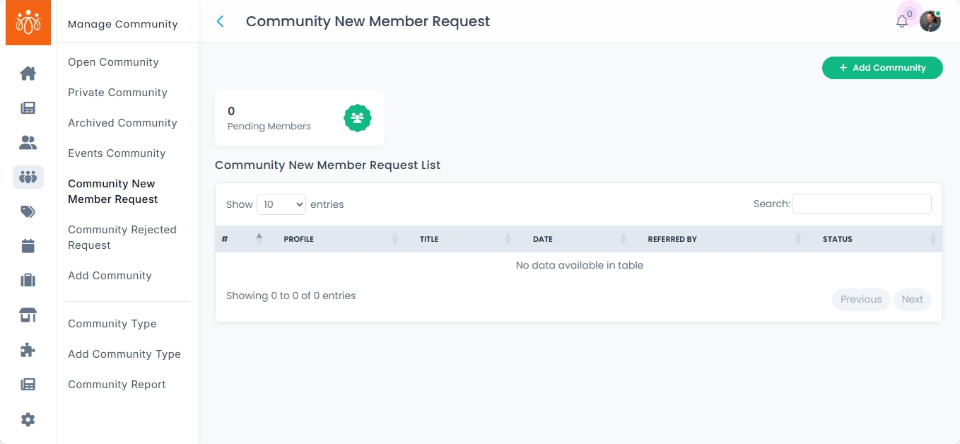
Managing Community New Member Requests
Navigation Path:
Community → Community New Member Request
Overview:
The Community New Member Request section displays all pending requests from users wishing to join specific communities. Each request contains the member’s name, the community they want to join, and any message they included with their request. Administrators can review these requests and decide whether to approve or reject them.
When to Use:
-
You want to manage access to communities by reviewing incoming join requests.
-
You need to ensure that community membership criteria are met before granting access.
-
You want to maintain community quality and security through controlled membership.
Steps to Manage New Member Requests:
-
Access New Member Requests
Go to Community New Member Request under the Community menu to view the list of pending join requests. -
Review Request Details
For each request, check the user’s name, the community they want to join, and read any accompanying join message to understand their intent. -
Approve or Reject Requests
Use the Approve icon to accept the user into the community.
Use the Reject icon to deny the request.
Confirm any prompts to finalize your decision.
Best Practices:
-
Review join messages carefully to assess the suitability of each applicant.
-
Maintain clear criteria for approval to ensure the community remains focused and secure.
-
Communicate membership decisions transparently when appropriate, to foster a positive user experience.
Tip:
Regularly monitor and respond to new member requests promptly to keep community engagement active and welcoming.