Managing and Creating Polls
Navigation Path:Content → Polls
Overview:
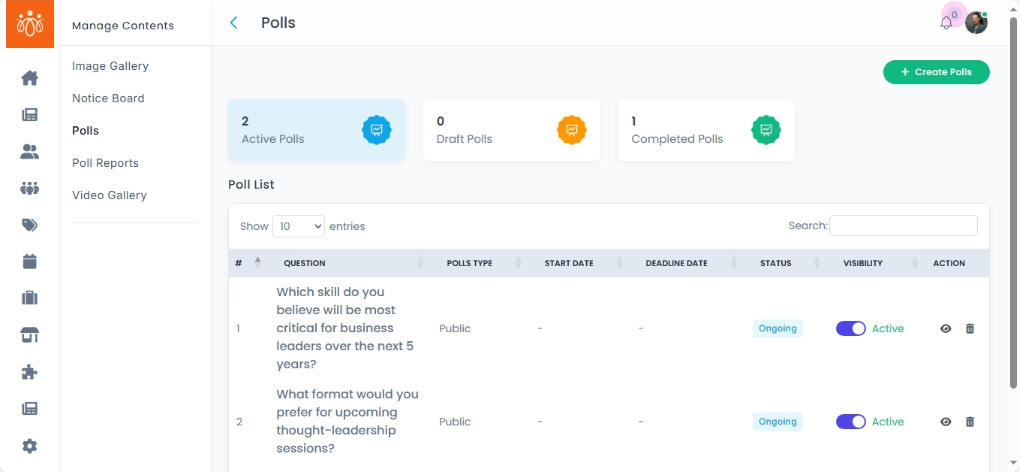
The Polls section allows admins to create, manage, and track polls for collecting feedback, opinions, or votes from members. Polls can be public (visible to all) or community-based (restricted to specific groups). Admins can view Active, Draft, and Completed polls in separate tabs for easier organization.
When to Use:
-
Running quick surveys for decision-making.
-
Collecting opinions on upcoming events, features, or community initiatives.
-
Engaging members with interactive content.
Viewing Existing Polls:
-
Navigate to Content → Polls.
-
Switch between the tabs to view:
-
Active Polls – Currently running polls that members can vote on.
-
Draft Polls – Polls that are prepared but not yet published.
-
Completed Polls – Polls that have ended, with results available for review.
-
Creating a New Poll:
-
Click Add Poll.
-
Fill in the following details:
-
Question – The main poll question (keep it clear and concise).
-
Options – Add answer choices for members to select from.
-
Deadline– Set the start and end date/time for voting.
- Credits - Choose whether to assign a credit value for participation or choose no if no credits are to be awarded.
- Result type - Decide if the results should be visible instantly after voting or revealed at a scheduled time.
-
Visibility – Choose:
-
Public – Accessible to all platform users.
-
Community-based – Restricted to a specific group or membership type.
-
-
-
Click Save & Publish to make the poll live immediately.
-
If you wish to publish later, save the poll as a draft.
-
Best Practices:
-
Keep poll questions short and easy to understand.
-
Limit the number of options to avoid overwhelming participants.
-
Use community-based polls for targeted engagement and more relevant results.
-
Review results from completed polls to guide decisions and improve member satisfaction.