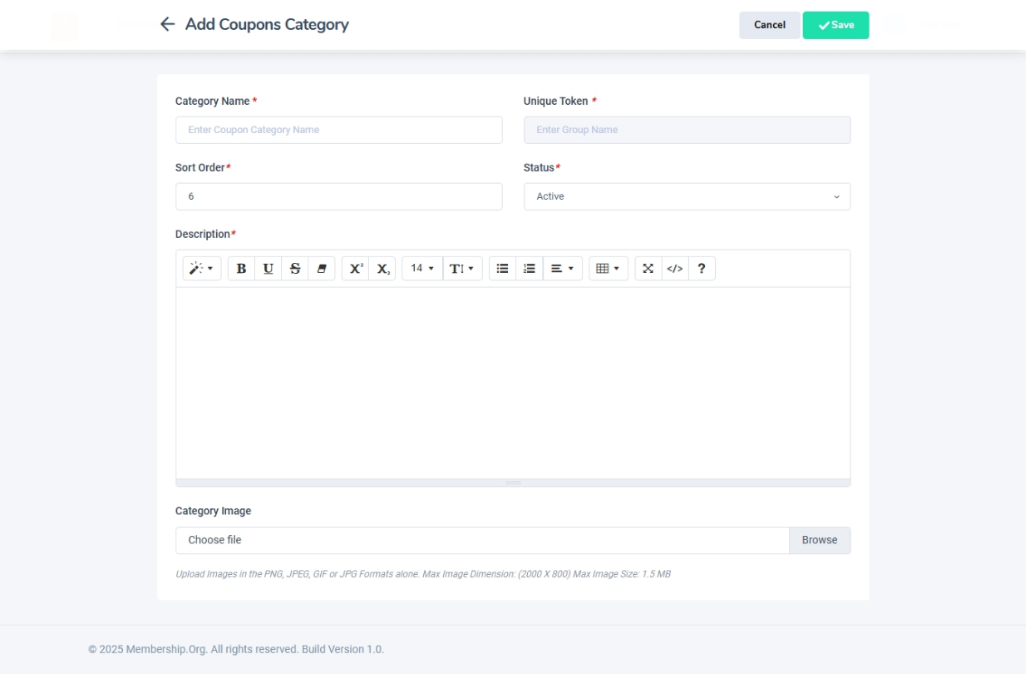
Adding a New Coupon Category
Navigation Path:Coupons → Add Coupons Category Form
Overview:
The Add Coupons Category Form is used to create new categories for organizing coupons. These categories make it easier to group related promotions (e.g., “Membership Discounts,” “Festival Offers”) and quickly assign them during coupon creation.
When to Use:
-
Introducing a new type of promotion that doesn’t fit existing categories.
-
Organizing seasonal or event-specific campaigns.
-
Structuring discounts for better reporting and management.
Steps to Add a New Coupon Category:
-
Access the Add Coupons Category Form
-
Navigate to Coupons → Add Coupons Category Form from the admin dashboard.
-
-
Enter Category Details
-
Category Name – Provide a short, clear name for the category (e.g., “New Year Specials,” “Early Bird Offers”).
-
Description – Add a brief explanation of the category’s purpose or usage.
- Image – Optionally, add a category image that helps identify it with ease.
-
-
Save the Category
-
Click Save to create the new category.
-
Once saved, it will be available as a selectable option in the coupon creation form.
-
Best Practices:
-
Keep category names concise and easy to identify during coupon creation.
-
Use the description to clarify which types of promotions belong in the category.
-
Avoid duplicate category names to maintain clean data organization.