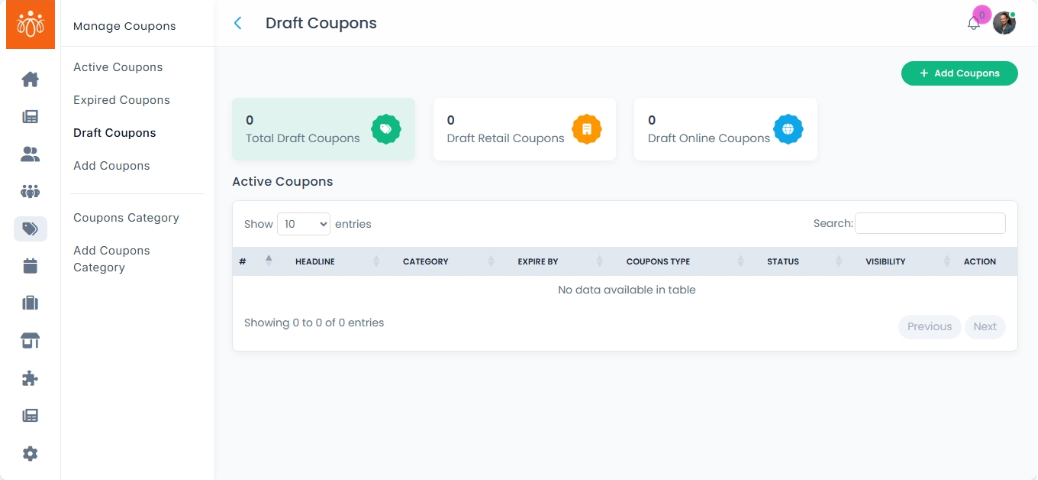
Managing Draft Coupons
Navigation Path:Coupons → Draft Coupons
Overview:
The Draft Coupons section contains coupons that have been created but not yet activated or published. Draft status allows admins to prepare coupon details in advance and only make them active when the promotion is ready to launch.
When to Use:
-
Preparing promotions ahead of time.
-
Reviewing coupon details before activation.
-
Storing incomplete coupons for later editing.
Features & Actions:
-
View Draft Coupons List
-
Navigate to Coupons → Draft Coupons.
-
The list displays:
-
Headline
- Category
- expire by
- coupon type
- visibility
-
-
-
Edit a Draft Coupon
-
Click Edit next to the coupon you want to finalize.
-
Update any details such as discount, validity period, status, category etc..
-
Once ready, click Save & Activate to publish the coupon.
-
-
Keep as Draft
-
If the coupon is not yet ready for release, leave it in draft status until the appropriate time.
-
Best Practices:
-
Use draft status for promotions tied to future events or seasonal campaigns.
-
Review all details for accuracy before publishing to avoid errors in the discount application.
-
Avoid clutter by deleting unused drafts periodically.