Managing Active Coupons
Navigation Path:Coupons → Active Coupons
Overview:
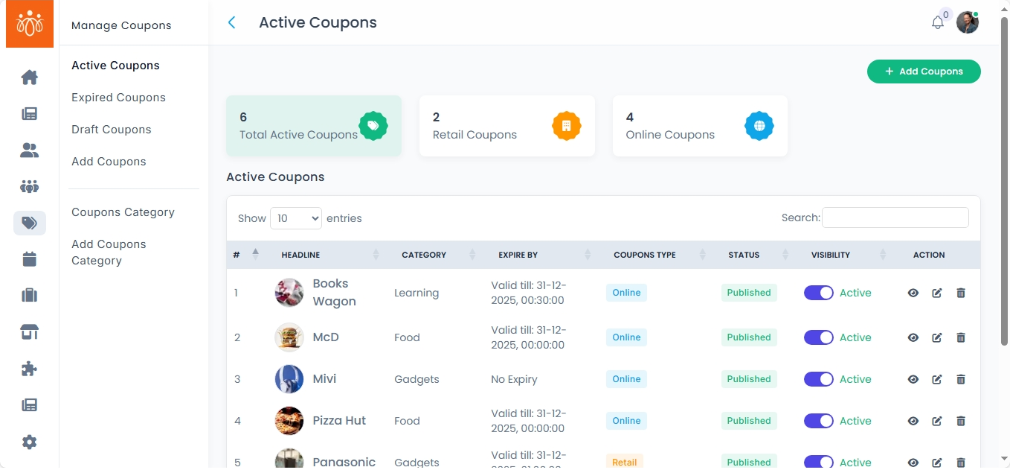
The Active Coupons section lists all coupon codes that are currently valid and can be redeemed by members. This view helps admins monitor ongoing promotions, track usage, and ensure that all active coupons are functioning as intended.
When to Use:
-
Reviewing all ongoing discounts and promotional codes.
-
Monitoring coupon usage to evaluate campaign performance.
-
Managing coupon availability by updating or deactivating offers.
Details Displayed for Each Active Coupon:
-
Coupon Title – The name or description of the promotion (e.g., “Spring Sale 2025”).
- Category - The relevant category the coupon falls under.
- Coupon type – Indicates whether the coupon is for online or retail use.
-
Code – The actual code members must enter to redeem the discount.
-
Validity Period – The start and end dates of the coupon.
-
Company name - The name of the business offering the coupon.
Available Actions:
-
Edit Coupon – Update discount values, validity dates, or assigned membership plans.
-
Deactivate Coupon – Temporarily remove the coupon from active use without deleting it.
-
Delete Coupon – Permanently remove the coupon from the system (cannot be undone).
Best Practices:
-
Regularly review active coupons to ensure discounts are intentional and still valid.
-
Deactivate rather than delete coupons if you plan to reuse them in the future.