Managing Your Profile Details
Navigation Path:
Profile → My Profile
Overview:
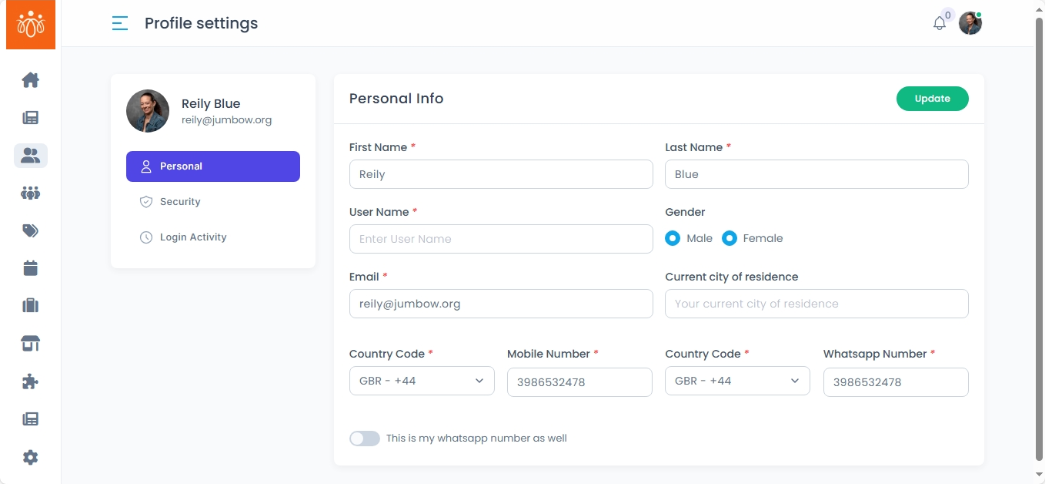
The My Profile section allows individual administrators to maintain accurate and up-to-date personal account information. Keeping your profile details current ensures smooth communication, accurate identification for audit purposes, and an optimized user experience within the platform.
When to Use:
-
You’ve changed your name, email address, or mobile number.
-
You want to ensure your contact details are accurate for notifications and account recovery processes.
Steps to Manage Your Profile Details:
-
Access My Profile
Click your profile avatar located in the top-right corner of the admin dashboard.
Select My Profile from the dropdown menu. -
View and Update Personal Details
In the My Profile section, review your current administrative details such as:-
Name
-
Mobile Number
-
Email ID
To update any field, click into the respective box and update your current information.
-
-
Save Your Changes
After editing any profile fields, click Update to confirm updates.
A confirmation message will appear, indicating that your profile modifications have been saved.
Best Practices:
-
Accuracy: Keep your information (especially email and mobile number) current to avoid missing important communications or account recovery alerts.
-
Professionalism: Use a clear, professional photo to help colleagues quickly identify you.
-
Privacy: Avoid sharing sensitive information in your profile fields unless explicitly required by your organization’s policies.
Tip:
Regularly review your profile details to ensure all information is current and to facilitate seamless collaboration and communication within your organization.