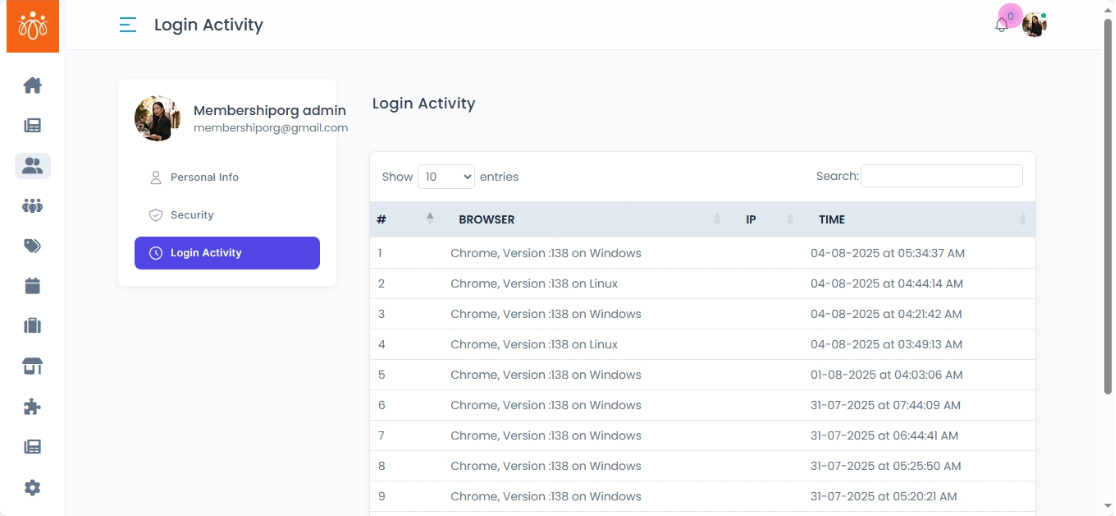
Viewing Login Activity
Navigation Path:Profile → Login Activity
Overview:
The Login Activity section provides a detailed log of all login attempts made to your admin account. Each record includes the masked IP address, device information, and timestamp, helping admins track account access and identify any unusual or unauthorized activity.
When to Use:
-
Monitoring for suspicious logins from unfamiliar locations or devices.
-
Auditing multiple admin sessions.
-
Keeping a record of account access for security compliance.
Details Available for Each Login Entry:
-
Masked IP Address – The network address used during the login.
-
Device Details – Information about the browser, operating system, or device type.
-
Login Timestamp – Exact date and time of access.
Benefits:
-
Detect unauthorized logins quickly.
-
Verify legitimate access during audits.
-
Track how often and from where administrators are accessing the system.
Best Practices:
-
Regularly review your login activity for unfamiliar IP addresses or devices.
-
If suspicious activity is detected, reset your password immediately.
-
Consider enabling two-factor authentication (2FA) if available.
-
Keep your device software updated to prevent security vulnerabilities.