Home / Dashboard Overview
Overview:
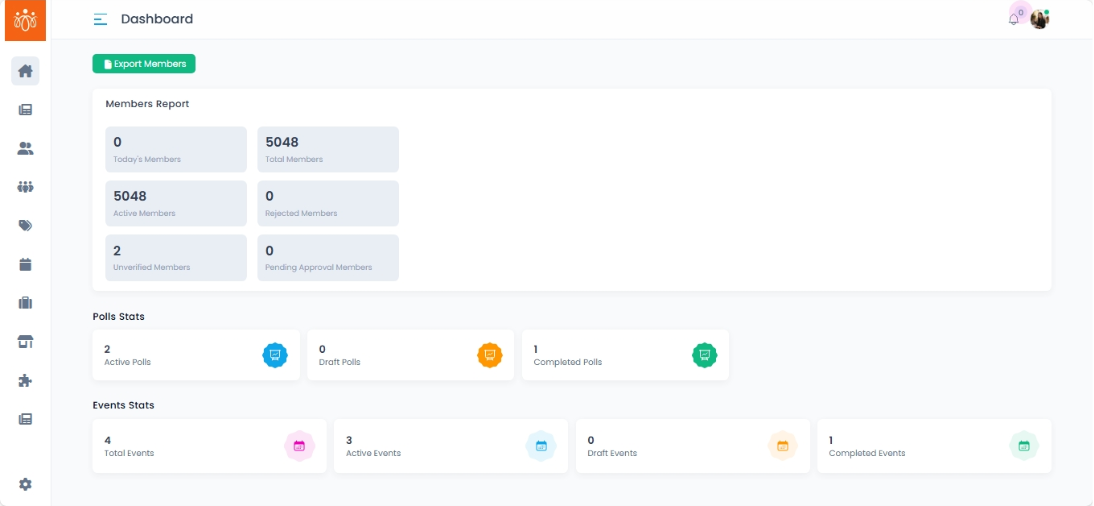
After logging in, admins land on the Home / Dashboard section. This is the central hub for monitoring platform activity, community engagement, and overall growth. It provides at-a-glance statistics and quick access to key administrative functions.
Key Dashboard Components:
-
Members Report
-
Displays key membership metrics:
- Recent signups – Members who have recently signed up
-
Total members – Overall number of registered members.
-
Rejected members – Members who have been rejected
-
Unverified Members – Users pending verification.
-
Pending members approval – Total no.of approval pending
-
-
Poll Stats
-
Overview of platform polling activity:
-
Active Polls – Currently running polls.
- Draft Polls - Unpublished polls saved for future editing or launch
-
Completed Polls - Polls that have been closed or have reached their end date.
-
-
-
Event Stats
-
Summary of event-related activity:
-
Total Events – Overall number of events created.
-
Completed Events – Past events with finished sessions.
- Active Events - Ongoing or upcoming events currently visible to members.
- Draft Events – Events in preparation, not yet published.
-
-
-
Export Member List
-
Option to download the full member list in CSV format.
-
Useful for reporting, offline analysis, or backup purposes.
-
Purpose & Benefits:
-
Quickly assess community engagement levels.
-
Monitor growth trends across members, polls, and events.
-
Identify areas requiring attention, such as low participation or unverified members.
-
Access essential administrative tools without navigating multiple menus.