Managing Active Events
Navigation Path:
Events → Active Events
Overview:
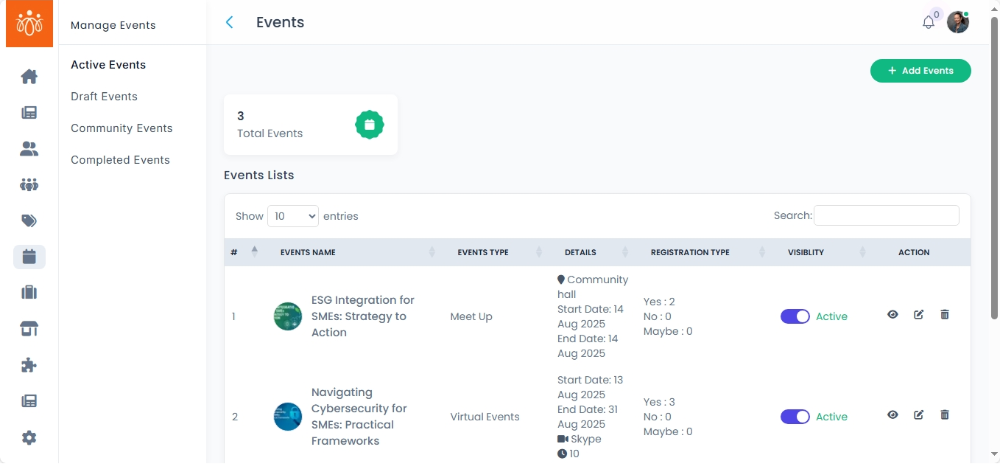
The Active Events section displays all live and upcoming events on the platform. This feature enables administrators to monitor ongoing event details, manage participants, and make timely updates or changes as needed.
When to Use:
-
You want to view details of events that are currently live or scheduled to take place soon.
-
You need to monitor participant lists and engagement for active events.
-
You want to edit event information or deactivate events that are no longer relevant.
Steps to Manage Active Events:
-
Access Active Events
Navigate to Active Events under the Events menu to see a list of all live and upcoming events. -
View Event Details
Click View next to any event to see comprehensive details, including event description, date, location, and participant list. -
Edit or Deactivate Events
Use the available options to update event information or deactivate the event if it needs to be canceled or postponed.
Best Practices:
-
Regularly check active events to ensure all information is accurate and up to date.
-
Monitor participant lists to gauge interest and manage event capacity.
-
Deactivate events promptly if they are canceled to avoid confusion.
Tip:
Use the Active Events section to maintain smooth event operations and enhance participant experience through timely management and communication.