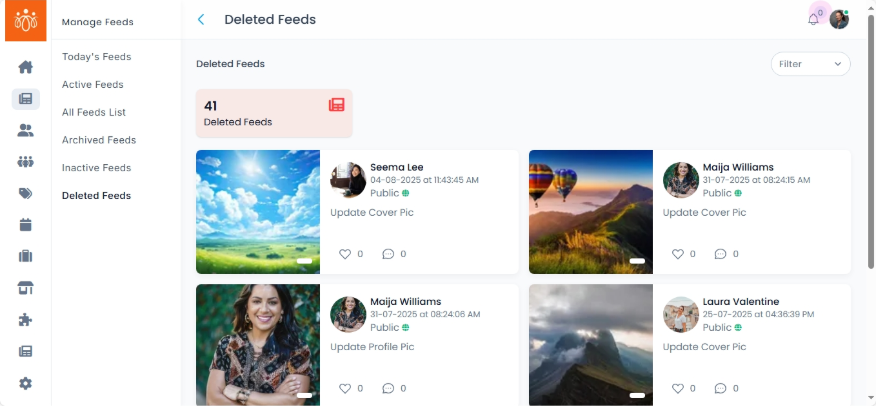
Managing Deleted Feeds
Navigation Path:Feeds → Deleted Feeds
Overview:
The Deleted Feeds section lists all posts that have been removed from the platform’s active content and placed in the deleted feeds area. This section serves as a safeguard, allowing admins to review removed content.
When to Use:
-
Reviewing deleted posts.
-
Restoring content that was deleted by mistake.
Features & Actions:
-
View Deleted Feeds List
-
Navigate to Feeds → Deleted Feeds.
-
The list includes:
-
Post content
-
Name
-
Posted date with time
-
Like and comment activity
-
-
-
Restore a Deleted Feed
-
Click Revoke to move the post back to its original state (Active, Inactive, or Archived).
-
The restored post will immediately follow its previous visibility rules.
-
Best Practices:
-
Always double-check content before permanent deletion to avoid losing important posts.
-
Use the revoke option for posts that have ongoing value or relevance.
-
Keep deletion logs for compliance and content moderation audits.