Managing Active Feeds
Navigation Path:Feeds → Active Feeds
Overview:
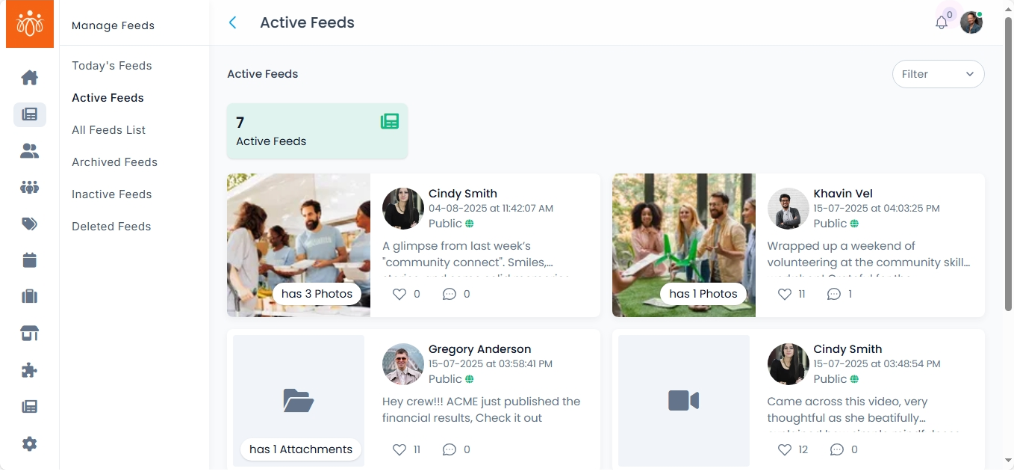
The Active Feeds section lists all posts that are currently live and visible to members on the platform. Admins can monitor, filter, and manage these posts to ensure content remains relevant, accurate, and aligned with community guidelines.
When to Use:
-
Reviewing all currently visible posts for quality control.
- Archiving or deleting posts that are outdated or no longer relevant.
Features & Actions:
-
View Active Feeds List
-
Navigate to Feeds → Active Feeds.
-
Each post will display:
-
Post content
-
Name
-
Date Posted with time
-
Visibility (public or community)
-
Current Engagement (likes, comments, etc., if available)
-
-
-
Filter Active Feeds
-
Use filters to narrow down results by:
-
Date – View posts from a specific period.
-
-
-
Manage Posts via Actions Menu
-
Hide -the post can be made hidden by the admin
-
Archive – Remove the post from the public feed but keep it stored for future reference.
-
Delete – Permanently remove the post from the system (cannot be undone).
- Reports - admin can check the no.of user reported on the post
- Deleted comments - admin can view the feeds deleted comments
-
Best Practices:
- Archive rather than delete if a post may be useful for future reference or seasonal reuse.