Managing Today’s Feeds
Navigation Path:Feeds → Today’s Feeds
Overview:
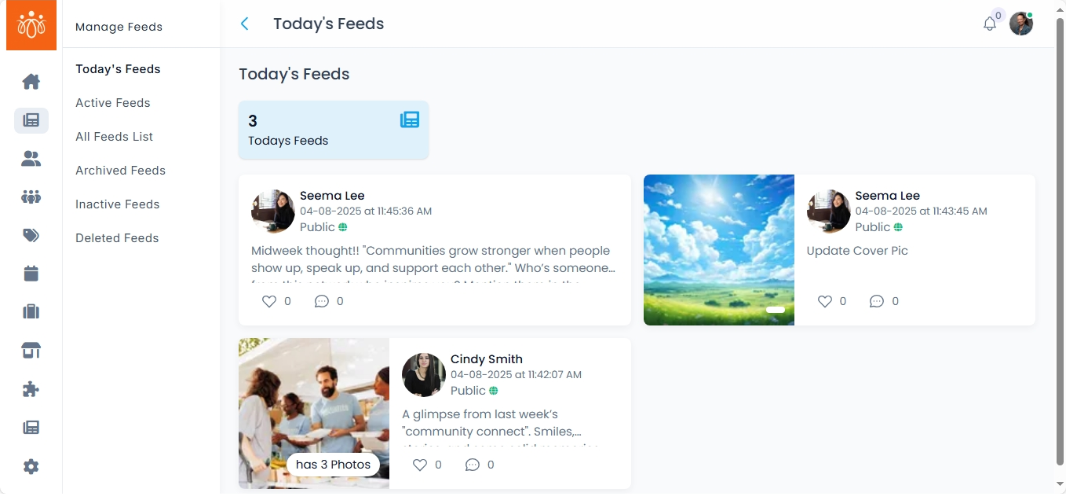
The Today’s Feeds section displays all posts that have been posted by the members on the platform within the current day. Admins can review and manage these feeds in real time, ensuring that all published content meets community guidelines and engagement goals.
When to Use:
-
Quickly responding to inappropriate or off-topic posts.
-
Tracking daily engagement and content flow on the platform.
Features & Actions:
-
View Today’s Feeds
-
Navigate to Feeds → Today’s Feeds.
-
The list shows:
-
Post Title or Description
-
Author Name
-
Time Posted & Date
-
Visibility : Public or Community post
-
-
-
Archive a Feed
-
Select Archive to remove the post from the active feed while keeping it stored in the system for reference.
-
-
Delete a Feed
-
Click Delete to permanently remove the post from the platform.
-
Use this option for spam, inappropriate content, or duplicates.
-
-
Feed details
-
This shows the feed details that are posted today
- Here the post content, name of the member, posted time and date, visibility (either public/community), No.of likes and comments are displayed.
-
Best Practices:
-
Review all daily posts for quality and compliance with community rules.
- Use archiving for posts you want to retain but no longer feature publicly.