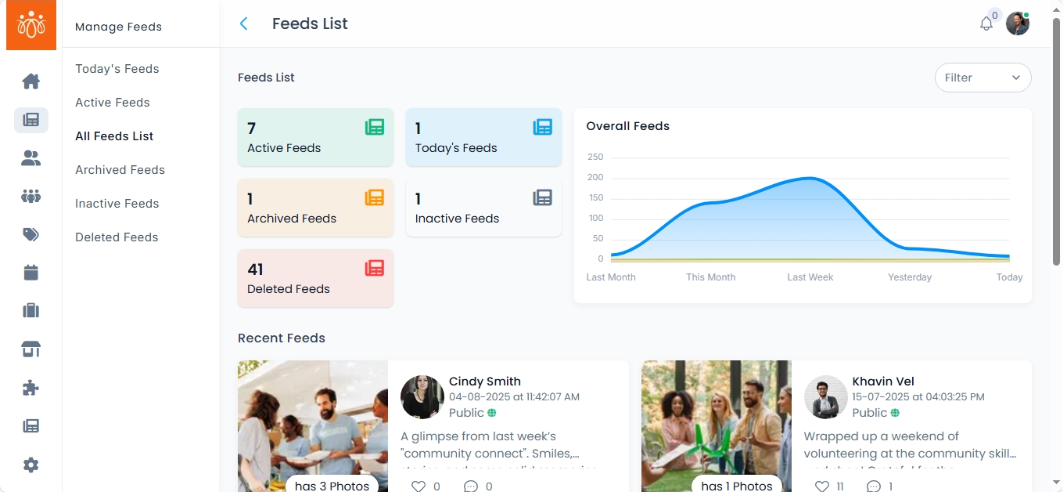
Viewing and Managing All Feeds
Navigation Path:Feeds → All Feeds List
Overview:
The All Feeds List is the master database of every user-generated post on the platform, regardless of its current status (Active, Inactive, Archived, todays or deleted). This section is a central hub for content moderation, historical review, and bulk management of posts.
When to Use:
-
Moderating posts across all statuses in one place.
-
Filtering posts for audits, compliance checks, or content reports.
Features & Actions:
-
View the Complete Feed List
-
Navigate to Feeds → All Feeds List.
-
The list shows all posts with:
-
Post content
-
Name
-
Post Date with time
-
Visibility
-
-
-
Filter Feeds
-
Narrow the results by:
-
Date Range – View posts from a specific time period.
-
-
-
Overall feeds Visual Representation
-
-
The visual chart provides admins with an at-a-glance overview of the frequency of active, archived, and inactive feeds posted by community members, helping them understand engagement and content trends effectively.
-
-
Best Practices:
- Maintain periodic audits of older content to ensure it remains accurate and aligned with platform guidelines.