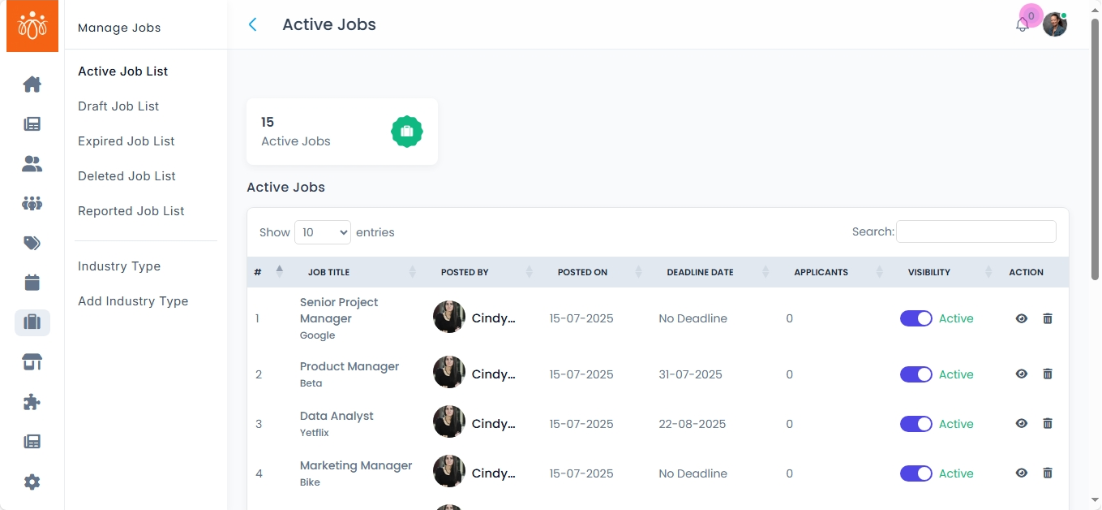
Managing Active Job List
Navigation Path:
Jobs → Active Job List
Overview:
The Active Job List displays all job postings that are currently published and visible to job seekers. This section allows administrators to view, manage visibility or delete active job listings efficiently, ensuring the job board remains current and relevant
When to Use:
-
You want to monitor all live job postings on the platform.
-
You want to deactivate job posts that are no longer available or relevant.
Steps to Manage Active Jobs:
-
Access Active Job List
Navigate to Active Job List under the Jobs menu to see all published job postings. -
View Job Details
-
About Job: Job title, Deadline if any, Company Name, Industry type, Years of experience needed, Description, Web Link, Name of the member who posted the job, Total number of applicants, and recent applicants (Applied date, Applicant name, experience, remarks and attachments)
-
Applicants: Applied date, Applicant name, experience, remarks and attachments of all applicants.
-
Short Listed: Applied date, Applicant name, experience, remarks and attachments of shortlisted applicants.
-
Reported: Reported date, Name of the member who made the report, reason and remarks.
-
Best Practices:
-
Regularly review active jobs to ensure all postings are accurate and up to date.
-
Maintain clear and attractive job descriptions to encourage quality applications.
Tip:
Use the Active Job List to keep your job board dynamic and organized, helping job seekers find opportunities that are truly available and relevant.