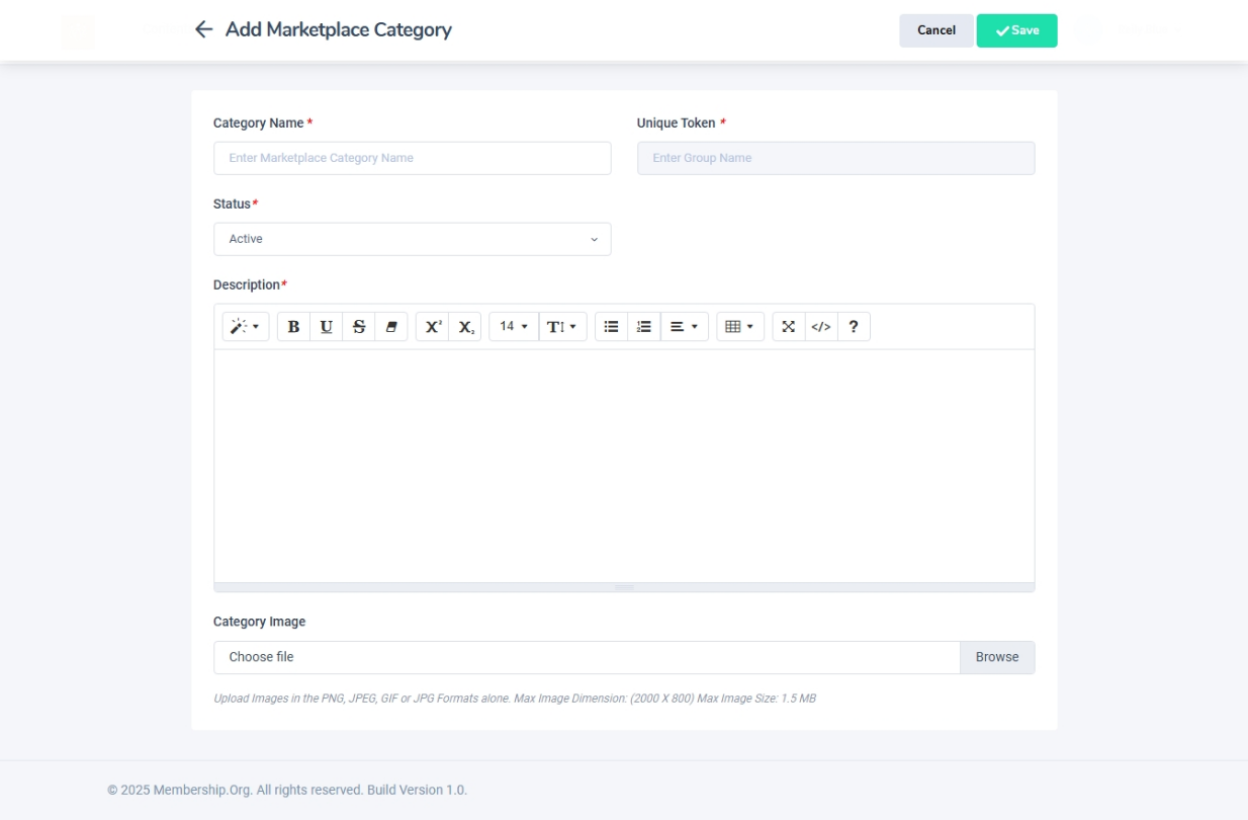
Adding a New Marketplace Category
Navigation Path:Marketplace → Add Marketplace Category Form
Overview:
The Add Marketplace Category Form is used to create new categories in the marketplace. These categories help vendors classify their listings, making it easier for users to search, browse, and filter relevant companies or products.
When to Use:
-
Introducing a new industry or business type to the marketplace.
-
Expanding category options for upcoming vendor listings.
-
Organizing marketplace offerings to improve discoverability.
Steps to Add a New Category:
-
Open the Form
-
Navigate to Marketplace → Add Marketplace Category Form from the admin menu.
-
-
Enter Category Details
-
Category Name (Required):
Enter the title of the new category.
Example: Event Management, Cybersecurity Services, Wellness & Fitness. -
Description (Required):
Add a short explanation of the category for reference or public display.
Example: Vendors providing software solutions for event planning and management. -
Category Image (Optional)
Attach an image that visually represents the category.
Example: An icon of a calendar for Event Management, a shield symbol for Cybersecurity, or a dumbbell for Wellness & Fitness.
-
-
Save the Category
-
Click Save to create the new category.
-
Once saved, the category will appear instantly in the marketplace category list.
-
Vendors can immediately assign their listings to this category.
-
Best Practices:
-
Keep category names short, descriptive, and relevant.
-
Avoid duplicate or overly similar category names to prevent confusion.
-
Use the description field to clarify category scope when necessary.