Managing Approved Companies in the Marketplace
Navigation Path:Marketplace → Approved Companies
Overview:
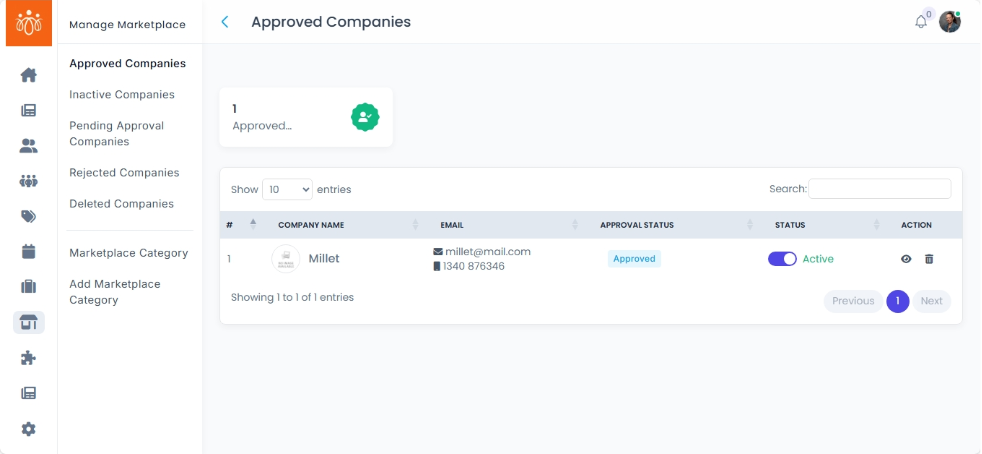
The Approved Companies section displays all company listings that have passed the review process and are currently active in the marketplace. These listings are publicly visible to members and visitors, allowing them to browse company profiles, explore product or service offerings, and make inquiries. As an admin, you can manage these listings, update their status, and ensure they meet marketplace standards.
When to Use:
-
Reviewing active companies for quality control.
-
Checking vendor information and offerings.
-
Deactivating listings that no longer meet requirements.
Available Actions:
-
View Company Profiles
- The approved companies list displays the following details about each company: Company name, contact information (email, mobile number), approval status and status (active/inactive).
-
Click the View button next to the company name.
-
Review details including:
-
About marketplace: Date of creation, Address, Description, Name of the owner, Total calls initiated, Total Profile visits and Today Leads.
-
Recent Leads: Profile, date, details and message
-
Company Enquiry: Profile name, date, contact details and message.
-
Product Enquiry: Profile name, date, contact details and message
- Profile Viewed: Profile name, date, time and contact details (email & mobile number)
- Products: Product name, price, description and status
- Catalogue: Title and catalogue attachments
-
-
Deactivate a Listing
-
Click the Move to Trash/ toggle visibility to inactive button if a company needs to be hidden temporarily.
-
Confirm the action in the prompt.
-
Once deactivated, the company will move to the Deleted/Inactive Companies section and will no longer be visible to members.
-
Best Practices:
-
Conduct periodic reviews of approved companies to maintain marketplace quality.
-
Communicate with vendors if you detect outdated or incomplete profiles.
-
Use deactivation instead of deletion when you anticipate the company may return to active status.