Managing Membership Coupon Codes
Navigation Path:Members → Coupon Codes
Overview:
The Coupon Codes section allows admins to create and manage promotional codes for membership plans. Coupons can be used to offer fixed-amount discounts or percentage-based reductions, helping attract new members, reward loyalty, or support special campaigns.
When to Use:
-
Running seasonal or festival membership promotions.
-
Offering discounts to specific groups, such as students or early registrants.
-
Providing incentives for bulk registrations or renewals.
Viewing Existing Coupons:
-
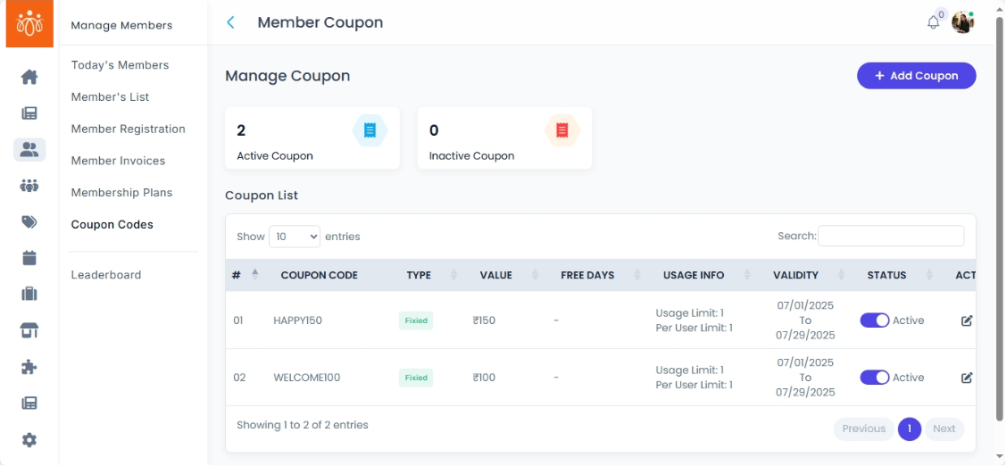
Navigate to Members → Coupon Codes.
-
The coupon list displays:
-
Coupon Title – The name or purpose of the promotion (e.g., Summer Sale 2025).
-
Code – The unique code members will enter to receive the discount.
-
Assigned Plan(s) – Which membership plan(s) the coupon applies to.
-
Expiry Date – When the coupon will no longer be valid.
-
Usage Count – How many times the coupon has been redeemed.
-
Creating a New Coupon:
-
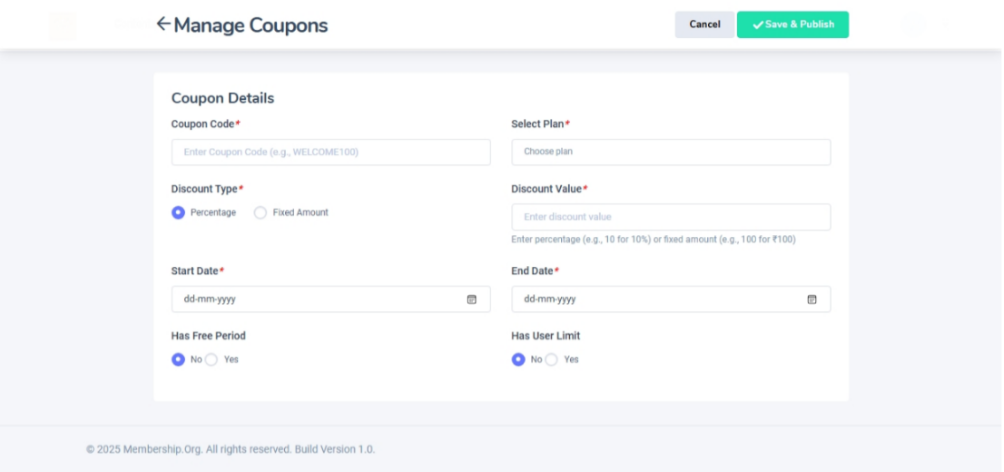
Click Add Coupon.
-
Fill in the following fields:
-
Title – Internal name for identifying the promotion.
-
Code – The exact code members will enter during registration or renewal.
-
Discount Type – Choose between:
-
Fixed Amount (e.g., $10 off)
-
Percentage (e.g., 20% off)
-
-
Valid From–To – Set the start and end dates for the coupon’s availability.
-
Assign Plan – Select the specific membership plan(s) the coupon applies to.
-
-
Click Save & Activate.
-
The coupon will now appear in the list and be available for members to use.
Best Practices:
-
Use clear, memorable codes (e.g., WELCOME20, SUMMER25).
-
Always set an expiry date to create urgency and limit misuse.
-
Monitor Usage Count to measure campaign performance.