Viewing and Managing Members
Navigation Path:Members
Overview:
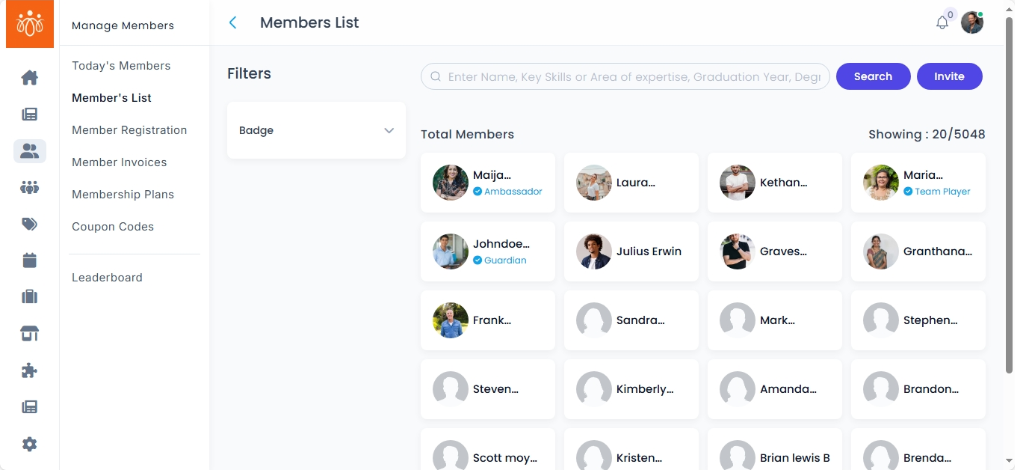
The Members section provides a complete list of all registered users on the platform. Admins can search, filter, and manage member profiles directly from this page. This is the central hub for viewing member details, assigning badges, or making them inactive.
When to Use:
-
Looking up a specific member’s profile.
-
Filtering members based on criteria such as badge, or name.
-
Managing member details or recognition badges.
Features & Actions:
-
Search & Filter Members
-
Use the search bar to find a member by name.
-
Apply filters by badge (e.g., Premium, VIP).
-
-
View Member Details
-
click on the member’s name to view the details.
-
This opens the member profile, showing:
-
Information such as name, registered date, device type, device version.
-
Badge(s) assigned
- Personal information suchh as membership code, gender, mail id and contact details
-
Total feeds, archived feeds, active community, unfollowed community.
- Wallet
- like and comment activity
- blocked and reported user
- Member log, wall of appreciation, invitations, marketplace and Quiz
-
-
-
Edit Member Profile
-
From the profile view, click Edit.
-
Update fields such as general information, contact details, or designation.
-
Save changes to update the member’s record.
-
-
Assign a Badge
-
From the member profile, click Assign Badge.
-
Select a badge from the available list and click Submit.
-
The badge will appear on their profile immediately.
-
-
Inactivate Member
-
From the member list, choose the member you wish to inactivate, and click Inactivate Member.
-
Confirm the action in the prompt by clicking Yes.
-
Inactive members will no longer have access to the platform, unless access is granted again by the admin.
-
Best Practices:
-
Always confirm the reason before deleting a member to avoid accidental removal.
-
Keep member records updated to ensure accurate reporting and communication.