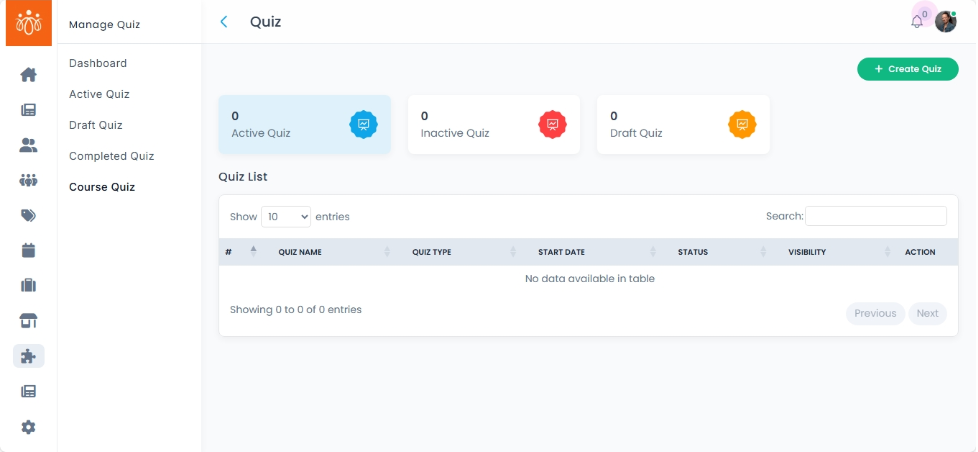
Managing Course Quizzes
Navigation Path:Quiz → Course Quiz
Overview:
The Course Quiz section lists quizzes that are linked to specific structured learning modules or training programs. These quizzes are typically used for evaluating participants’ understanding of a course’s content and may form part of a certification or completion requirement.
When to Use:
-
Managing quizzes that are part of formal training or e-learning programs.
-
Assigning course-related quizzes to members or groups.
-
Reviewing participant performance for certification or progress tracking.
Features & Actions:
-
View Course Quiz List
-
Navigate to Quiz → Course Quiz to see all quizzes tied to courses or training modules.
-
Each listing may include:
-
Quiz Name – Title of the quiz.
- Quiz type – shows the type of quiz
- Start date – shows when the quiz started
- Status – shows the status of the quiz
- visibility - shows the visibility status of the quiz
-
Action – you can view the quiz details here
-
-
-
Manage Quiz Content
-
Click View to open the quiz.
-
-
Assign to Quiz
-
When you create a quiz, you have the option to assign it to a specific community or course.
-
For linked courses, the quiz will be automatically assigned to all enrolled participants.
-
-
View Results & Performance
-
Access participant scores and result percentage.
-
Best Practices:
-
Ensure that course quizzes align directly with the learning objectives of the linked training program.
-
Use quizzes to reinforce key concepts and measure knowledge retention.
-
Keep questions updated when course content changes to maintain accuracy.