Managing Draft Quizzes
Navigation Path:Quiz → Draft Quiz
Overview:
The Draft Quiz section contains all quizzes that have been created but not yet published. These are works-in-progress that can be edited, reviewed, and finalized before going live to members. Drafts are useful when you want to prepare quiz content in advance without making it immediately available.
When to Use:
-
Saving partially completed quizzes for later completion.
-
Reviewing and approving quiz content before publication.
-
Removing unwanted quizzes that will not be used.
Features & Actions:
-
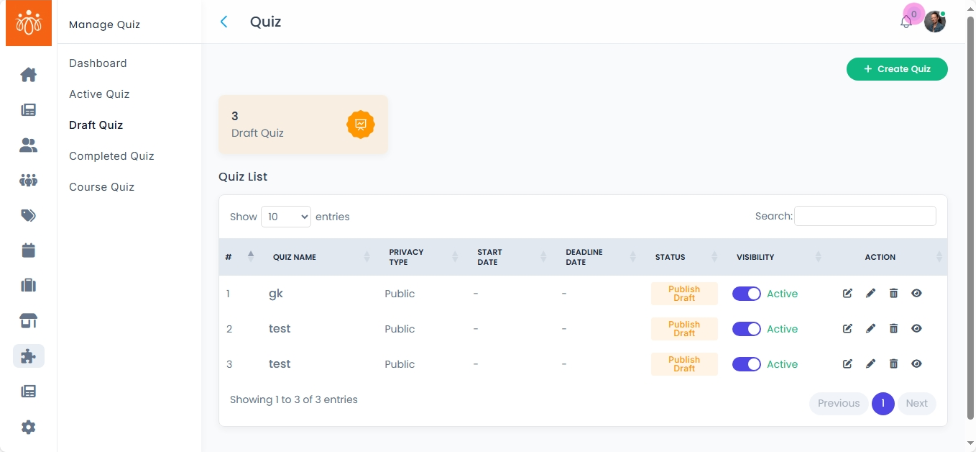
View Draft Quiz List
-
Navigate to Quiz → Draft Quiz to see all unpublished quizzes.
-
The list will show:
-
Quiz Name – The working title of the quiz.
-
Start date and Deadline date – When the quiz was published and when did it end
-
Status – Draft (not visible to participants).
-
-
-
Edit a Draft Quiz
-
Click Edit next to the quiz you want to work on.
-
Add or modify questions, update instructions, or adjust settings such as time limits and scoring.
-
Once complete, you can publish the quiz from the edit screen.
-
-
Delete a Draft Quiz
-
If a draft quiz is no longer needed, click Move to trash.
-
Confirm the deletion — this action cannot be undone.
-
Best Practices:
-
Use clear naming conventions so drafts are easy to identify.
-
Review draft quizzes with relevant stakeholders before publishing.
-
Regularly clear unused drafts to keep the quiz list organized.