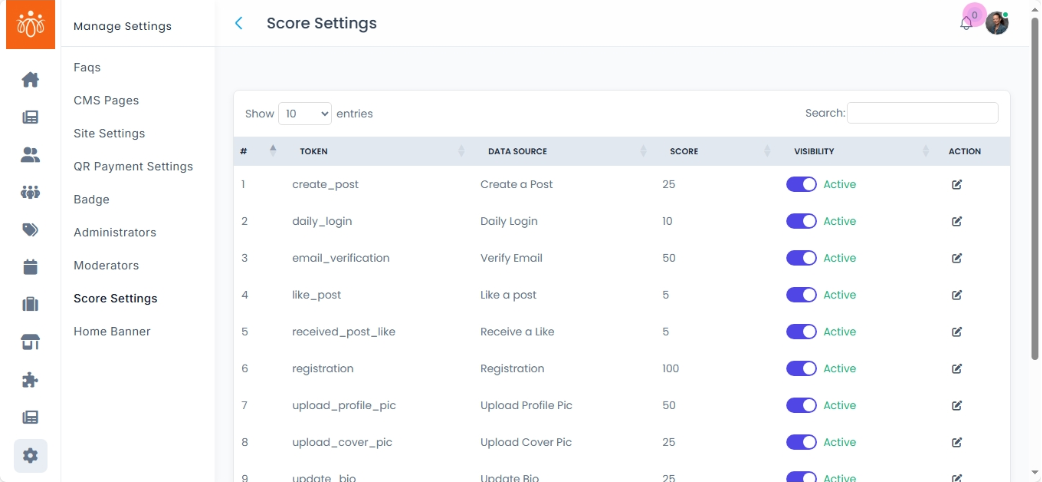
Configuring Score Settings
Navigation Path:Settings → Score Settings
Overview:
The Score Settings section allows admins to define the number of points awarded to members for completing specific activities on the platform. These points contribute to a member’s overall score and may be used for gamification, rankings, or leaderboard displays to encourage engagement.
When to Use:
-
Adjusting engagement incentives to align with community goals.
-
Rewarding specific actions more heavily during campaigns or events.
-
Balancing point values to maintain fair competition on leaderboards.
Common Actions and Their Scoring:
-
Creating a Post – Reward members for contributing new content.
-
Commenting – Encourage interaction and discussion.
-
Attending a Quiz or Event – Recognize participation in structured activities.
-
Participating in Polls – Incentivize engagement in decision-making and feedback activities.
Editing Score Values:
-
Navigate to Settings → Score Settings.
-
Find the action you wish to update from the list.
-
Click Edit Score next to that action.
-
Adjust the points value as desired.
-
Click Save to apply the new score settings.
Best Practices:
-
Assign higher points to actions that have greater value for community growth and engagement.
-
Review and adjust scoring periodically to keep it fair and relevant.
-
Communicate any scoring changes to members to maintain transparency and motivation.