Viewing and Managing Leaderboards
Access Points:
-
From Settings → Score Settings
-
From the Main Dashboard (if leaderboard visibility is enabled for members)
Overview:
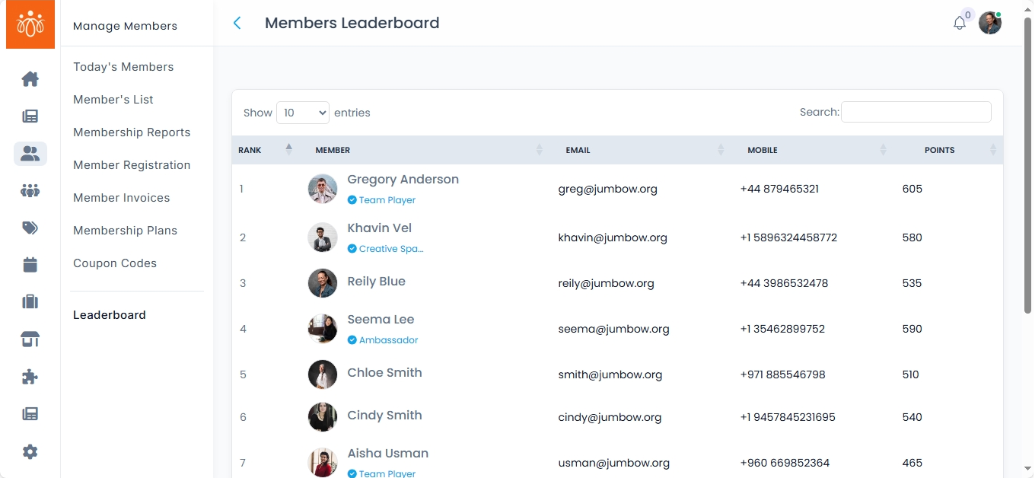
The Leaderboard displays the top members ranked by their total engagement score, based on points earned from activities such as posting, commenting, attending events or quizzes, and participating in polls. This gamification feature promotes healthy competition and encourages members to be more active in the community.
When to Use:
-
Monitoring top contributors to recognize and reward engagement.
-
Running competitions or campaigns based on participation.
-
Analyzing which members or communities are most active.
Features & Actions:
-
Viewing the Leaderboard
-
Access the leaderboard from the Members Module by clicking on the hamburger menu.
The list displays:
Member Name – The user’s display name.
Email - displays email of the user
Mobile - displays mobile number
Points earned - displays the number of points earned by the user.
-
-
Search bar
Search bar allows you to search individuals by their name to view their scores. -
Recognition & Rewards (Optional)
-
Use leaderboard results to highlight top members in announcements.
-
Offer badges, certificates, or perks to encourage ongoing engagement.
-
Best Practices:
-
Keep the leaderboard visible to members if you want to drive participation.
-
Balance scoring so no single activity dominates the rankings unfairly.