Configuring Site Settings
Navigation Path:Settings → Site Settings
Overview:
The Site Settings section controls the core appearance and contact information for your Jumbow platform. It is divided into two tabs — General Settings and Contact Info — allowing admins to customize branding and ensure accurate organizational details are displayed across the site and communications.
1. Site Settings
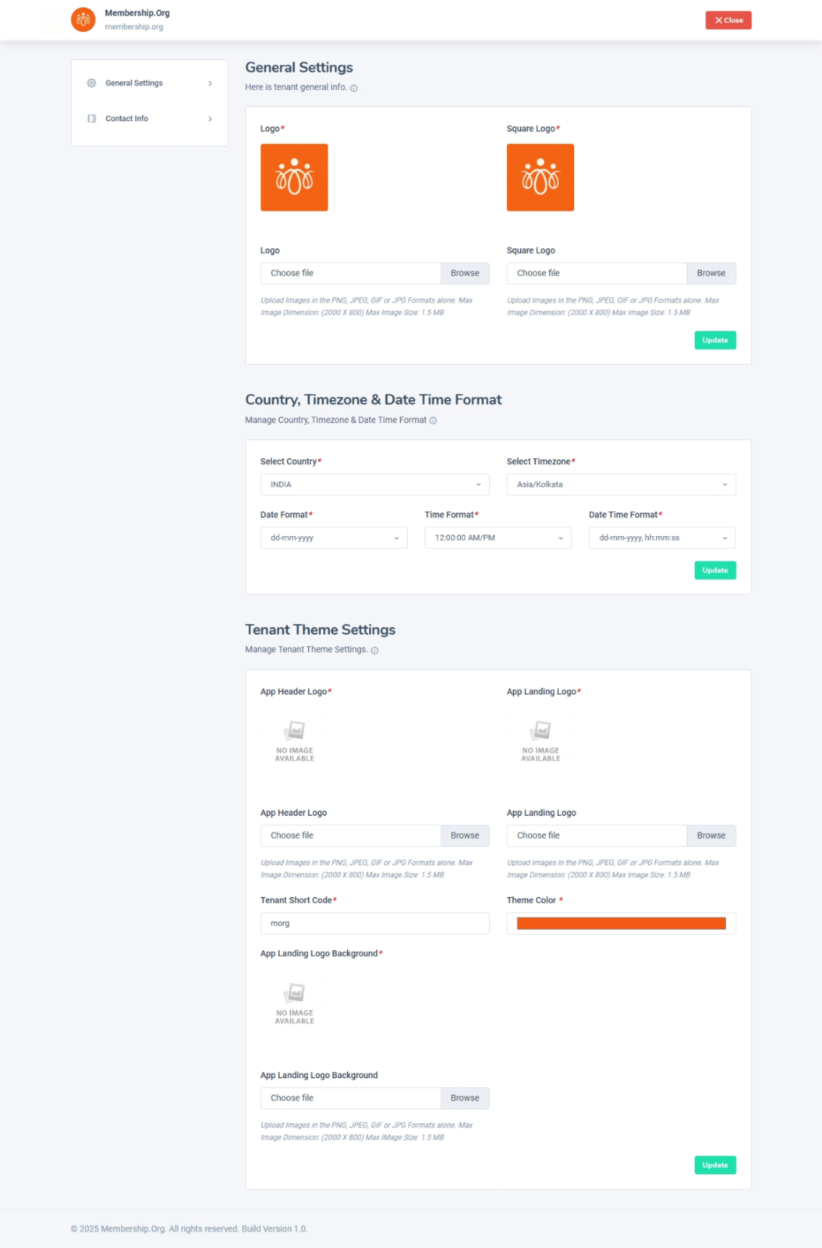
This tab is used to configure the basic branding and appearance of your platform.
General settings: logo, country, time zone, date & time format, and date time format.
Tenant theme settings: App Header logo, tenant short code, theme colour and app landing logo background.
Tips:
-
Use high-resolution logos for a professional look.
-
Choose a color theme that aligns with your brand identity.
2. Contact Info
This tab is used to set the official contact details for your organization, which may be displayed in footers, emails, and public pages.
Available Fields:
-
Phone Number – The primary contact number for support or inquiries.
-
Email Address – The main email ID for official communication.
- Social links – You can add your organization’s social links for the following platforms Facebook, Twitter, YouTube channel, Instagram, Telegram, GitHub, Snapchat, Medium, Reddit, Stack Overflow and LinkedIn
-
Physical Location – Your organization’s address for reference or compliance purposes.
Tips:
-
Ensure contact details are accurate to avoid missed communications.
-
If using a support-specific phone or email, make sure they are monitored regularly.