Configuring Score Settings
Navigation Path:Settings → Score Settings
Overview:
The Score Settings section allows admins to control the points system for user engagement activities on the platform. Points are awarded for various actions — such as posting updates, attending events, or participating in polls and quizzes — and contribute to each user’s profile score and position on the leaderboard.
This gamification feature encourages active participation and can be tailored to match your organization’s engagement goals.
When to Use:
-
Adjusting the weight of specific activities based on importance.
-
Launching a new campaign or engagement initiative that requires point recalibration.
-
Resetting or balancing scores to ensure fair competition among members.
Editing Scoring Values:
-
Access the Score Settings Page
-
Go to Settings → Score Settings from the admin dashboard.
-
-
Select the Action to Edit
-
You’ll see a list of tracked activities (e.g., Create a Post, Attend Event, Complete Quiz).
-
Each activity displays its current point value.
-
-
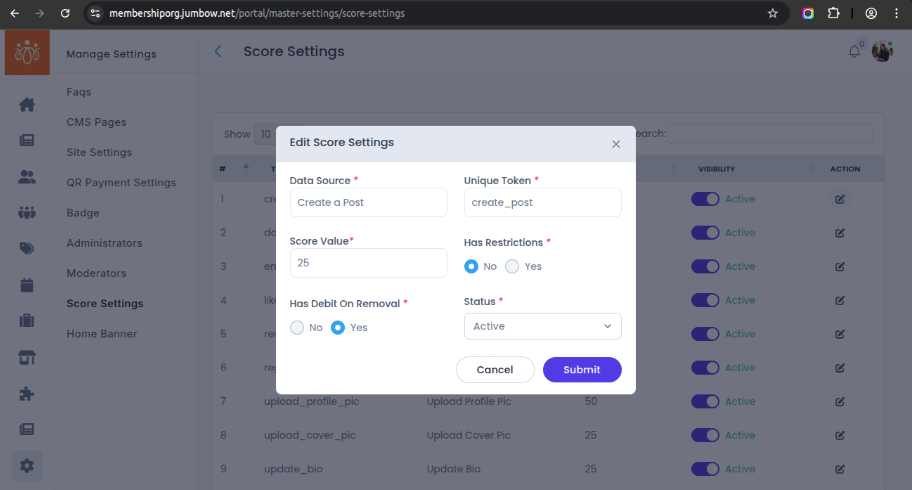
Edit Score
-
Click Edit Score next to the activity you want to change.
- You can also edit other fields like enabling or disabling restrictions (daily limit, count per item, count per unique item/post type), debit on removal (yes/no) and toggle status from active to inactive or vice versa.
-
Enter the new number of points to be awarded for that activity.
-
Example: Increase "Join Community" from 10 points to 20 points.
-
-
-
Save Changes
-
Click Save to update the scoring rules.
-
The new point values take effect immediately and will be applied to future activities.
-
Impact of Score Changes:
-
Leaderboard – Updated scores contribute to the ranking of members on the leaderboard in real time.
-
User Profile Score – Points earned through activities are displayed on each member’s profile, motivating continued engagement.
Best Practices:
-
Assign higher points to actions that have greater community value (e.g., hosting an event, contributing high-quality content).
-
Review score settings periodically to maintain fairness and engagement balance.
-
Communicate scoring changes to members to keep them informed and motivated.